Class 3 DSC India 2025: Complete Registration Guide
Complete Guide to Class 3 Digital Signature Certificates (DSC)
Introduction: Why Every Business Needs a Class 3 DSC in 2025
Can't file your company's annual returns on the MCA V3 Portal? Facing authentication errors on the GST Portal? The solution is a valid Class 3 Digital Signature Certificate (DSC).
Zero-Click Answer: A Class 3 Digital Signature Certificate is a legally valid electronic authentication mechanism issued by licensed Certifying Authorities under the Controller of Certifying Authorities (CCA), mandatory for ROC filings, GST returns (for specific taxpayers), e-tendering, and income tax compliance. As of 2024, only Class 3 DSCs are valid—Class 2 certificates have been discontinued.
Since July 2024, the Indian government implemented stricter Identity Verification Guidelines (IVG), requiring video KYC verification and direct invoicing from Certifying Authorities. This guide covers everything you need to know about obtaining, registering, and troubleshooting Class 3 DSCs in 2025.
What is a Class 3 Digital Signature Certificate?
A Class 3 Digital Signature Certificate is the highest level of digital authentication available to individuals and organizations in India. It provides both signing and encryption capabilities, ensuring the authenticity and integrity of electronic documents submitted to government portals.
Key Features of Class 3 DSC:
Legal Validity: Recognized under the Information Technology Act, 2000
Dual Functionality: Available as "Class 3 Signing Only" or "Class 3 Sign & Encrypt"
High Assurance: Requires physical verification and biometric authentication
Regulatory Compliance: Mandatory for MCA, GST, and income tax filings
USB Token Storage: Stored on encrypted hardware devices (epass2003, epass2003Auto)
Why Class 2 DSCs Are No Longer Valid
As of 2024, the Controller of Certifying Authorities (CCA) discontinued Class 2 certificates for all government portal authentications. All existing Class 2 DSC holders must upgrade to Class 3 for continued compliance.
Types of Class 3 Digital Signature Certificates
Understanding the difference between DSC types ensures you purchase the right certificate for your specific needs.
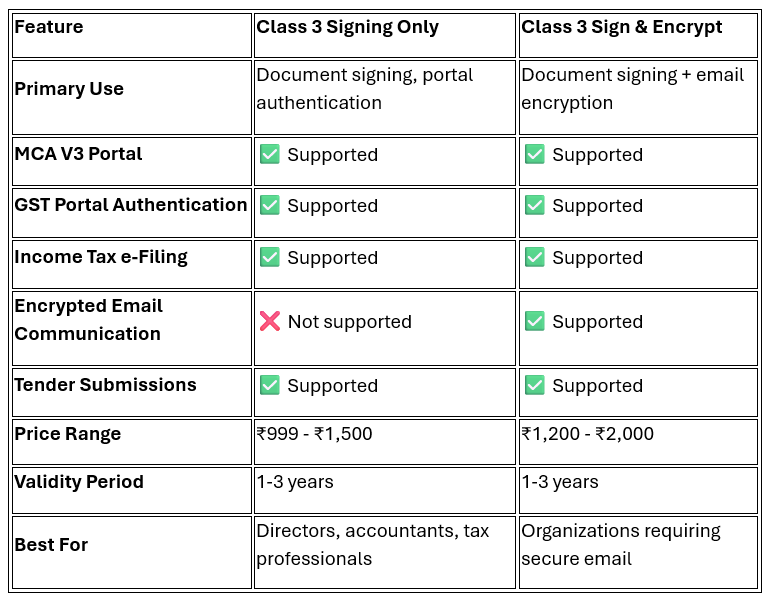
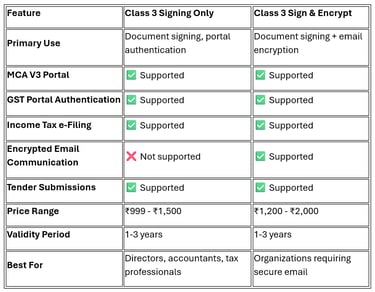
Class 3 Signing vs. Class 3 Sign & Encrypt: Comparison Table
Organization vs. Individual DSC
Individual DSC: Issued in the name of a person (director, partner, proprietor)
Organization DSC: Issued in the company's name for institutional filings
Recommendation: Directors should obtain individual DSCs with their DIN (Director Identification Number)
Who Needs a Class 3 Digital Signature Certificate in 2025?
Mandatory Requirements:
Company Directors: For filing annual returns, board resolutions, and compliance forms on MCA V3 Portal
Chartered Accountants: For signing audit reports and certifications
Company Secretaries: For statutory filings and compliance certificates
GST Taxpayers: Businesses with aggregate turnover exceeding ₹5 crores (for specific return forms)
Income Tax Assessees: For filing returns above specified threshold limits
Government Contractors: For e-tendering and e-procurement portals
Import-Export Code Holders: For DGFT portal submissions
Optional but Recommended:
Practicing professionals (lawyers, cost accountants)
Authorized signatories of LLPs and partnerships
Trademark and patent applicants
How to Obtain a Class 3 DSC: Complete Step-by-Step Process (2025)
The July 2024 IVG guidelines introduced mandatory video KYC verification for all DSC applications. Here's the updated process:
Step 1: Choose a Licensed Certifying Authority
Select a CCA-licensed Certifying Authority. Popular options include:
eMudhra (emSigner platform)
Sify Technologies
nCode Solutions
Capricorn Identity Services
IDRBT (Institute for Development and Research in Banking Technology)
Step 2: Select DSC Type and Validity
Certificate Type: Class 3 Signing or Class 3 Sign & Encrypt
Validity Period: 1 year, 2 years, or 3 years
USB Token: epass2003 or epass2003Auto (hardware device)
Step 3: Complete the Online Application
Visit your chosen CA's website
Fill the application form with accurate details:
Full name (as per PAN card)
PAN number
Email address and mobile number
Organization details (if applicable)
DIN (for directors)
Step 4: Upload KYC Documents
Mandatory Documents:
PAN Card (mandatory identity proof)
Aadhaar Card (address and identity verification)
Photograph (passport-size, recent)
For Directors: DIN Approval Letter
For Organizations: Certificate of Incorporation
Document Specifications:
Format: PDF or JPG
Size: Maximum 2 MB per document
Quality: Clear, legible scans
Step 5: Video KYC Verification (Post-July 2024 Requirement)
As per the updated IVG guidelines:
Schedule a video KYC appointment with the CA
Keep original documents ready for verification
Ensure stable internet connection and proper lighting
The CA representative will verify your identity and documents live
Process duration: 10-15 minutes
Step 6: Payment and Invoice
Make payment through secure gateway
The Certifying Authority will issue a direct invoice (mandatory as per July 2024 guidelines)
Payment methods: Net banking, credit/debit card, UPI
Step 7: DSC Issuance and Delivery
Processing time: 3-7 working days after successful video KYC
You'll receive the USB token via courier at your registered address
The token contains your encrypted digital certificate
Cost Breakdown (2025):
Class 3 Signing (1 year): ₹999 - ₹1,200
Class 3 Signing (2 years): ₹1,599 - ₹1,999
Class 3 Sign & Encrypt (1 year): ₹1,200 - ₹1,500
USB Token: ₹300 - ₹500 (one-time cost, reusable)
Video KYC charges: Usually included in the certificate cost
How to Register Class 3 DSC on Government Portals
Obtaining the DSC is only half the process. You must register it on each portal where you'll use it.
Registration on MCA V3 Portal (Ministry of Corporate Affairs)
Prerequisites:
Active user account on MCA portal
DSC with valid DIN linked
Java 8 Update 201 or higher installed
DSC Management Utility installed
Step-by-Step Process:
Install Required Software:
Download Java from the official MCA portal
Install the DSC Management Utility from MCA website
Ensure your browser allows Java applets
Login to MCA Portal:
Visit https://www.mca.gov.in
Navigate to MCA Services → e-Filing
Login with your credentials
Register DSC:
Go to "My Profile" or "Manage DSC"
Insert your USB token
Click "Register DSC"
Select your certificate from the dropdown
Enter the token password (default: often "12345678" or "password")
Submit for verification
Verification:
MCA system validates the certificate
Confirmation appears within 24-48 hours
You can now file forms using this DSC
Common Error: "DSC not detected" - Solution: Reinstall Java, clear browser cache, or use Internet Explorer in compatibility mode.
Registration on GST Portal
Step-by-Step Process:
Login to GST Portal:
Visit https://www.gst.gov.in
Login with GSTIN and password
Navigate to DSC Management:
Go to "My Profile"
Select "Manage DSC"
Register DSC:
Install emSigner utility (mandatory for GST portal)
Download from GST portal's resources section
Insert USB token
Click "Register DSC"
Verify certificate details
Submit
Activation:
OTP will be sent to registered mobile and email
Enter OTP to complete registration
DSC is now active for GST return filing
Important: For GST authentication, ensure your DSC contains the same PAN linked to your GSTIN.
Registration on Income Tax e-Filing Portal
Step-by-Step Process:
Login to Income Tax Portal:
Login with PAN and password
Register DSC:
Go to "My Profile" → "Manage DSC"
Install the Validate DSC utility from portal
Insert USB token
Click "Register Digital Signature"
Select certificate and verify
Verification:
System validates the certificate against PAN
Confirmation displayed immediately
DSC ready for return filing and audit report submission
Essential Software and Utilities for DSC Usage
To use your Class 3 DSC effectively, you must install specific software on your computer.
Mandatory Software Installations:
Java Runtime Environment (JRE):
Version: Java 8 Update 201 or higher
Purpose: Portal authentication and certificate detection
Download: From official portal resources or java.com
Platform: Windows, Mac, Linux
emSigner Utility:
Purpose: DSC signing and encryption for GST and other government portals
Download: From eMudhra website or GST portal
Features: WebSocket-based signing, bulk signing, PDF signing
Compatibility: Works with all major browsers (Chrome, Firefox, Edge)
DSC Management Utility:
Purpose: Certificate registration and management on MCA portal
Download: From MCA website
Platform: Windows only
USB Token Driver:
Type: SafeNet epass2003 driver
Purpose: Enables computer to detect USB token
Download: From your CA's website or SafeNet website
PDF Signing Software (Optional):
Adobe Acrobat Reader DC (for PDF signing)
Alternate: eSign application by CAs
Browser Compatibility (2025):
Best Performance: Google Chrome (latest version) with emSigner extension
MCA Portal: Internet Explorer 11 (compatibility mode) or Edge IE mode
GST Portal: Chrome, Firefox, Edge (with emSigner WebSocket service)
Income Tax Portal: Chrome, Firefox, Safari (with Java enabled)
Troubleshooting Common Class 3 DSC Errors
Error 1: "Digital Signature Certificate Not Detected"
Causes:
USB token not properly inserted
USB token driver not installed
Java not installed or outdated
Browser blocking Java applets
Solutions:
Reinsert USB token and restart computer
Install SafeNet epass2003 driver from CA's website
Update Java to version 8 Update 201 or higher
Add portal website to Java exception list:
Open Java Control Panel
Go to Security tab
Click "Edit Site List"
Enable Java in browser settings
Clear browser cache and cookies
Error 2: "Certificate Chain Not Trusted" or "Root Certificate Error"
Causes:
Root and intermediate certificates not installed
Expired CA certificates
Solutions:
Download root and intermediate certificates from your CA's website
Install certificates in Windows Certificate Store:
Open "certmgr.msc" (Certificate Manager)
Import root certificate to "Trusted Root Certification Authorities"
Import intermediate certificate to "Intermediate Certification Authorities"
Restart browser and try again
Error 3: "PAN Mismatch Error" on GST Portal
Causes:
DSC PAN differs from GSTIN-linked PAN
Incorrect PAN mentioned during DSC application
Solutions:
Verify PAN in DSC certificate:
Double-click USB token icon in system tray
View certificate details
Check "Subject" field for PAN
If PAN is incorrect, contact your CA for certificate revocation and reissuance
Ensure GSTIN and DSC PAN are identical
Error 4: "emSigner WebSocket Not Running"
Causes:
emSigner utility not installed or not running
Firewall blocking WebSocket connection
Port conflict
Solutions:
Install latest version of emSigner from eMudhra website
Ensure emSigner service is running:
Open Task Manager (Windows)
Check for "emSignerService" process
Add firewall exception for emSigner
Check if port 6600 is available (default emSigner port)
Restart emSigner service
Error 5: "DSC Validity Expired"
Causes:
Certificate crossed expiry date
Time synchronization issue
Solutions:
Check certificate validity:
View certificate properties from USB token
Note "Valid From" and "Valid To" dates
If expired, apply for DSC renewal from your CA
Sync system date and time with internet time server
Renewal process: Similar to new application, but faster processing (2-3 days)
Error 6: "Incorrect Password" or "Token Locked"
Causes:
Wrong token password entered multiple times
Token locked after 5-10 incorrect attempts
Solutions:
Use correct password (check documentation from CA)
If locked, contact your CA for PUK (Personal Unblocking Key)
Some tokens auto-unlock after 24 hours
For permanent lock, token replacement may be required
DSC Security Best Practices for Business Owners and Directors
Protecting your Class 3 DSC is crucial as it legally represents your signature.
Physical Security:
Store USB token securely: Keep in a safe or locked drawer when not in use
Never share your token: Each person must have their own DSC
Create strong password: Change default token password immediately after receiving
Backup strategy: Consider obtaining a duplicate token from your CA
Operational Security:
Use only on trusted computers: Avoid public or shared computers
Install antivirus software: Protect against malware and keyloggers
Enable firewall: Prevent unauthorized network access
Log out after use: Always eject token and close browser sessions
Monitor usage logs: Check filing history on portals for unauthorized use
Legal Compliance:
Report loss immediately: Contact CA and file police complaint if token is stolen
Revoke compromised certificates: Request immediate revocation from CA
Maintain documentation: Keep all invoices and certificates for audit trails
Renewal reminders: Set calendar alerts 30 days before expiry
Class 3 DSC for Specific Use Cases
For Company Directors (MCA Compliance):
Mandatory Forms Requiring DSC:
Form INC-20A (Commencement of Business)
Form MGT-7 (Annual Return)
Form AOC-4 (Financial Statements)
Form DIR-3 KYC (Director KYC)
Board resolutions and special resolutions
Best Practice: All active directors should obtain individual Class 3 DSCs linked to their DIN.
For Chartered Accountants:
Use Cases:
Signing audit reports (Form ADT-1)
Certification of financial statements
Income tax audit reports
GST audit reports
MSME Form 1 certifications
Recommendation: Class 3 Sign & Encrypt with membership number linked.
For GST Compliance:
When DSC is Mandatory:
Annual turnover exceeds ₹5 crores
Filing GSTR-9 (Annual Return)
Filing GSTR-9C (Reconciliation Statement certified by CA/CMA)
Input Service Distributor (ISD) registrations
Authentication Process: DSC must be registered on GST portal for EVC (Electronic Verification Code) generation.
For Import-Export Businesses:
DGFT Portal Requirements:
Applying for Import Export Code (IEC)
Filing shipping bills
Advance Authorization applications
EPCG (Export Promotion Capital Goods) applications
Portal: https://dgft.gov.in - Requires Class 3 DSC registration.
Class 3 DSC Renewal Process (2025)
DSC certificates typically have 1-3 year validity. Here's how to renew:
When to Renew:
Start renewal process 30-45 days before expiry
Expired DSCs cannot be used for any portal authentication
Late renewal may delay critical filings
Renewal Steps:
Contact Your CA: Email or call your original Certifying Authority
Submit Renewal Request: Provide existing certificate details
Video KYC Verification: Mandatory even for renewals (post-July 2024)
Updated KYC Documents: Submit fresh photographs and address proof if changed
Payment: Renewal costs are usually 20-30% less than new certificates
Token Reuse: Your existing USB token can be reused; CA will install new certificate
Portal Re-registration: Must re-register renewed DSC on all portals
Renewal Costs:
Class 3 Signing (1 year renewal): ₹799 - ₹999
No USB token cost if reusing existing one
Future of Digital Signatures in India (2025 and Beyond)
Aadhaar-Based e-Sign:
The government is promoting Aadhaar e-Sign as an alternative to DSC for certain low-risk documents. However, Class 3 DSC remains mandatory for:
MCA statutory filings
High-value tender submissions
Audit report certifications
Digital Locker Integration:
DigiLocker is being integrated with government portals for seamless document verification, but DSC authentication remains separate.
Blockchain-Based Certificates:
The CCA is exploring blockchain technology for certificate issuance and verification to enhance security and reduce fraud.
People Also Ask (FAQ Section)
Is DSC mandatory for private limited companies?
Yes, Class 3 Digital Signature Certificates are mandatory for private limited companies. Directors must use DSC to file annual returns (Form MGT-7), financial statements (Form AOC-4), and other statutory compliance forms on the MCA V3 Portal. At least one director must possess a valid Class 3 DSC for ROC filings.
What is the validity of Class 3 DSC?
Class 3 Digital Signature Certificates are available with 1-year, 2-year, or 3-year validity periods. Most business owners opt for 2-year validity for cost-effectiveness. The validity period starts from the date of issuance by the Certifying Authority. You must renew your DSC before expiry to avoid filing disruptions.
How to fix 'Certificate not to be trusted' error?
The "Certificate not to be trusted" error occurs when root and intermediate certificates are not installed on your computer. To fix this: (1) Download root and intermediate certificates from your CA's website, (2) Open Windows Certificate Manager (certmgr.msc), (3) Install root certificate under "Trusted Root Certification Authorities", (4) Install intermediate certificate under "Intermediate Certification Authorities", (5) Restart your browser. This establishes the complete certificate chain.
Can I use one Class 3 DSC for multiple companies?
Yes, if you're a director in multiple companies, you can use the same individual Class 3 DSC (linked to your DIN) for filing forms across all companies. However, each company's authorized signatory must have their own DSC. You cannot share your personal DSC with others.
What is the difference between Class 2 and Class 3 DSC?
As of 2024, Class 2 DSCs are discontinued for government portal authentication. Class 3 DSC offers higher security with mandatory physical verification and biometric authentication. Class 3 is legally required for MCA, GST, and income tax filings, while Class 2 was primarily used for lower-risk applications. All existing Class 2 holders must upgrade to Class 3.
How long does it take to get a Class 3 DSC?
After completing the video KYC verification and document submission, Class 3 DSC issuance takes 3-7 working days. The USB token is delivered via courier to your registered address. Emergency processing is available from some CAs for an additional fee (24-48 hours delivery). Processing time may extend during peak filing seasons (March-April for income tax, September for company filings).
Can I use Class 3 DSC on multiple computers?
Yes, Class 3 DSC stored on a USB token can be used on any computer. You need to install the required software (Java, emSigner, USB token driver) on each computer. Simply insert the USB token, enter your password, and authenticate. However, for security reasons, use DSC only on trusted computers, never on public or shared systems.
What happens if I lose my DSC USB token?
If you lose your DSC USB token: (1) Immediately contact your Certifying Authority to revoke the certificate, (2) File a police complaint (FIR), (3) Submit revocation request with FIR copy to CA, (4) Apply for a fresh DSC with new token. The revoked certificate becomes invalid instantly across all portals. Keep your CA's contact details handy for emergency revocation.
Is video KYC mandatory for DSC in 2025?
Yes, as per the July 2024 Identity Verification Guidelines (IVG) issued by the Controller of Certifying Authorities, video KYC verification is mandatory for all new DSC applications and renewals. You must schedule a live video call with the CA representative who will verify your identity and original documents. This process typically takes 10-15 minutes.
What is the cost of Class 3 DSC in 2025?
Class 3 DSC costs vary by validity period: 1-year signing certificate costs ₹999-₹1,200; 2-year costs ₹1,599-₹1,999; 3-year costs ₹2,500-₹3,000. Class 3 Sign & Encrypt certificates cost ₹200-₹300 more. USB token (epass2003) costs ₹300-₹500 extra but is reusable for renewals. Prices vary across Certifying Authorities; compare offerings before purchasing.
Schema Markup Suggestion
{
"@context": "https://schema.org",
"@type": "FAQPage",
"mainEntity": [
{
"@type": "Question",
"name": "Is DSC mandatory for private limited companies?",
"acceptedAnswer": {
"@type": "Answer",
"text": "Yes, Class 3 Digital Signature Certificates are mandatory for private limited companies. Directors must use DSC to file annual returns (Form MGT-7), financial statements (Form AOC-4), and other statutory compliance forms on the MCA V3 Portal. At least one director must possess a valid Class 3 DSC for ROC filings."
}
},
{
"@type": "Question",
"name": "What is the validity of Class 3 DSC?",
"acceptedAnswer": {
"@type": "Answer",
"text": "Class 3 Digital Signature Certificates are available with 1-year, 2-year, or 3-year validity periods. Most business owners opt for 2-year validity for cost-effectiveness. The validity period starts from the date of issuance by the Certifying Authority. You must renew your DSC before expiry to avoid filing disruptions."
}
},
{
"@type": "Question",
"name": "How to fix Certificate not to be trusted error?",
"acceptedAnswer": {
"@type": "Answer",
"text": "The Certificate not to be trusted error occurs when root and intermediate certificates are not installed on your computer. To fix this: (1) Download root and intermediate certificates from your CA's website, (2) Open Windows Certificate Manager (certmgr.msc), (3) Install root certificate under Trusted Root Certification Authorities, (4) Install intermediate certificate under Intermediate Certification Authorities, (5) Restart your browser."
}
},
{
"@type": "Question",
"name": "What is the cost of Class 3 DSC in 2025?",
"acceptedAnswer": {
"@type": "Answer",
"text": "Class 3 DSC costs vary by validity period: 1-year signing certificate costs ₹999-₹1,200; 2-year costs ₹1,599-₹1,999; 3-year costs ₹2,500-₹3,000. Class 3 Sign & Encrypt certificates cost ₹200-₹300 more. USB token (epass2003) costs ₹300-₹500 extra but is reusable for renewals."
}
},
{
"@type": "Question",
"name": "Is video KYC mandatory for DSC in 2025?",
"acceptedAnswer": {
"@type": "Answer",
"text": "Yes, as per the July 2024 Identity Verification Guidelines (IVG) issued by the Controller of Certifying Authorities, video KYC verification is mandatory for all new DSC applications and renewals. You must schedule a live video call with the CA representative who will verify your identity and original documents."
}
}
]
}
Conclusion: Your Next Steps
Class 3 Digital Signature Certificates are non-negotiable for Indian businesses operating in 2025. With the discontinuation of Class 2 certificates and stricter IVG guidelines introduced in July 2024, ensuring compliance is more important than ever.
Immediate Action Items:
Verify Your Current DSC: Check validity and whether it's Class 3
Upgrade if Using Class 2: Apply for Class 3 DSC immediately
Register on All Portals: Ensure DSC is active on MCA, GST, and income tax portals
Install Required Software: Java, emSigner, and DSC utilities
Set Renewal Reminders: Mark calendar 30 days before expiry
Secure Your Token: Implement physical and digital security measures
For Professional Assistance:
Consult your Chartered Accountant for DSC requirements specific to your business
Contact licensed Certifying Authorities for technical support
Refer to the Controller of Certifying Authorities (CCA) website for latest guidelines
By following this comprehensive guide, you'll navigate the Class 3 DSC ecosystem with confidence, ensuring seamless statutory compliance and avoiding last-minute filing complications.
Document Version: 2025.1
Last Updated: Based on July 2024 IVG Guidelines
Regulatory References: IT Act 2000, Companies Act 2013, CCA Guidelines, MCA Circulars
This article is for informational purposes only and does not constitute legal or financial advice. Consult qualified professionals for specific compliance requirements.
Get in Touch with DSC Guru
Have questions or need help choosing the right Digital Signature Certificate?
Our support team is here to assist you. Reach out to DSC Guru for fast, reliable, and friendly support.
📞 Phone:
📧 Email: contactdscguru@gmail.com
📍 Address: Atul First Gate, Valsad, Gujarat, Pincode: 396020
🕒 Working Hours: Mon–Sat, 10:00 AM – 7:00 PM
Contact Details
Follow Us
“DSC Guru is India’s trusted platform for Class 3 Digital Signature Certificates.
Fast processing, secure e-KYC, and free USB token delivery.”GST and compliance-ready tagline